quarta-feira, 11 de fevereiro de 2009

Reset Senhas do Windows (xp e vista)


Esqueceu sua senha do Administrador/Usuário do Windows? Deseja descobrir a senha da BIOS/CMOS do seu computador? Essa é a ferramenta certa para você!


O software trabalha em unidades USB, portanto não há necessidade de gravar em um CD.


Download RapidShare

EasyShare

sexta-feira, 6 de fevereiro de 2009

ATI Catalyst™ 9.1 Display Driver for Windows XP Professional/Home Edition


If you would like to take advantage of all the features of your ATI graphics card, we recommend using download option 1. If you only require basic functionality, we recommend you use option 2.


quarta-feira, 4 de fevereiro de 2009

Flash Recovery Toolbox

The software tool for recovering of the deleted filesCD Recovery Toolbox Free - repair damaged CD disks

Flash Recovery Toolbox is developed to recover files deleted from removable media and hard drives with the FAT file system (FAT12/FAT16/FAT32). Recovering deleted data with Flash Recovery Toolbox does not require any special knowledge or skills. The program will recover and save deleted files, images, photos or other valuable information in just 4 steps. The program makes use of several different data recovery algorithms and methods. The simultaneous use of all data analysis methods and the complete scan of the source device or drive allow the user to recover as many files as possible. The program recovers data from the following removable media:

  • Secure Digital Card (SD cards)
  • xD Picture Card
  • CompactFlash (type I/II) (CF cards)
  • Sony Memory Stick
  • Multimedia Card (MMC cards)
  • PC Card
  • Smart Media Card
  • IBM MicroDrive
  • Flash Card
  • Flash drive
  • USB drive
  • USB store device (with FAT and FAT32 file system)
  • Digital cameras
  • Diskette
  • and so on.

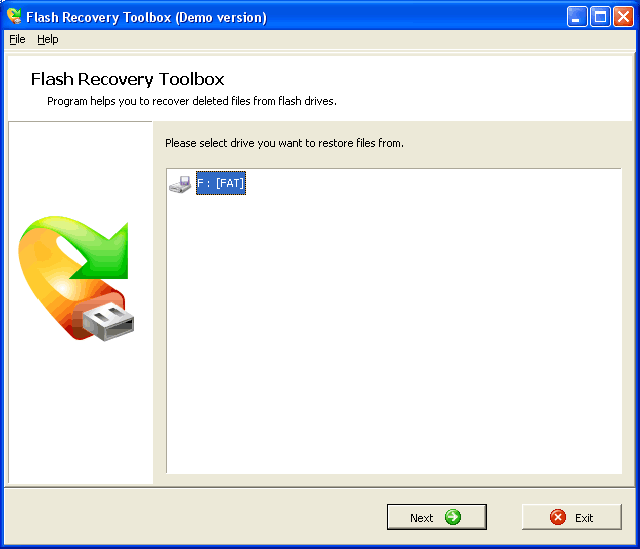
First page of Flash Recovery Toolbox

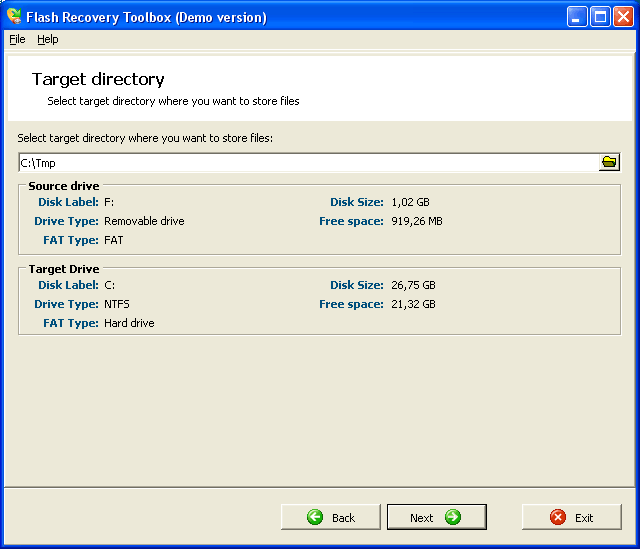
Second page of Flash Recovery Toolbox

The process of recovering deleted files consists of the following steps:

  1. Selecting the drive for recovery
  2. Seleting the location for saving data
  3. Scanning the media/drive, analyzing and recovering data
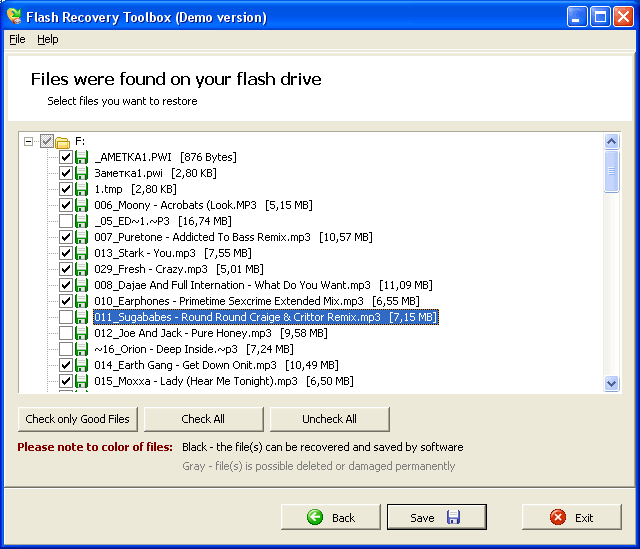
  4. Selecting files to be saved
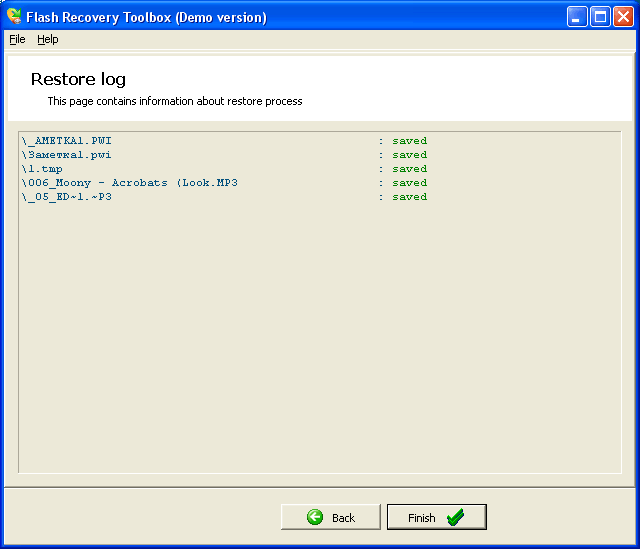
  5. Saving the recovered data

The user has to just select the source drive, select the location to save the source data to and select the files that should be saved. The program will do the rest of the job.

Flash Recovery Toolbox recovers deleted digital photos, digital video, audio records, video records, MP3 files, WMA files, movies, documents, messages, images, audio files, sound tracks and other files.

Third page of Flash Recovery Toolbox

Last page of Flash Recovery Toolbox

Flash Recovery Toolbox is distributed under the Try before Buy license. The user can save only the first 5 recovered files in the unregistered version of the tool. The registered version of Flash Recovery Toolbox has no limitations regarding the amount of recovered data.

The tool is compatible with Windows 98, Windows Me, Windows NT 4.0, Windows 2000, Windows XP, Windows XP SP2, Windows 2003, Windows Vista.

Recuperando arquivos do CD arranhado

CD Recovery Toolbox

Recover files from damaged or corruptedCD/DVD/HD DVD/Blu-Ray disks
CD Recovery Toolbox Free - repair damaged CD disks

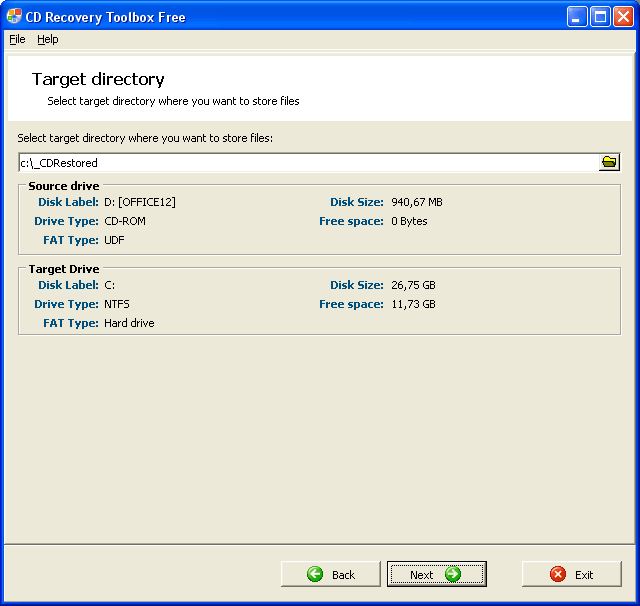
CD Recovery Toolbox (download) tool wasdeveloped forrecoveringdamaged files from different disk types: CD, DVD,HD DVD, Blu-Ray, etc. You can use it to restore information lost as a result of somemechanical damage of the disk (scratches, chips, different spots on thesurface) or as a result of incorrect recording. Thus, the program can recoverdata that was considered lost. The CD Recovery Toolbox Free tool scansany CD and DVD disks and finds files and folders located there. We shouldmention that there can be some information on the disk that cannot berecovered. Not all of the files andfolders can be found - that depends on thedegree and location of the damage. Therefore, the CD Recovery Toolbox Free tool finds the possible maximum amount of information. After that, it shows a list of all files and folders available for recovery. Now the user can select the files and folders to be recovered. Those specific objects will be recovered while the others will be ignored. The program recovers the maximum amount of information in the damaged file. This reduces the risk of data loss considerably.

Program features:

  • Recovering information from any CD and DVD disks
  • Recovering files larger than 4 Gb
  • Detecting possible lack of free space on the hard disk for storing the recovered files

Third page of CD Recovery Toolbox Free

Last page of CD Recovery Toolbox Free


Download CD Recovery Toolbox Free

The CD Recovery Toolbox Free tool not only has a complete set of data recovery features, but is also user-friendly and convenient. The program interface is designed as a step-by step wizard, where the user has to perform a single action on each page of the wizard. The wizard makes the use of the tool very simple and convenient even for a beginner.

CD Recovery Toolbox Free is absolutely free. Anyone can install it on the computer and use the program for an unlimited time. This fact is one of its main advantages over the rival software. Moreover, the functionality of the tool is equal to that of most paid software.

As for the fact that practically every PC user needs a tool for recovering information from CD and DVD disks, there is no doubt about it. As you know, these storage media are the most widely spread nowadays. They are rather capacious, all-purpose, durable and, what's important, inexpensive. The problem is - they aren't very reliable. A small scratch can result in a failure to read the information recorded on the disk. And the ways you can get this scratch are numerous - for example, the disk can fall down or suffer from careless handling.

The tool is compatible with Windows 98, Windows Me, Windows NT 4.0, Windows 2000, Windows XP, Windows XP SP2, Windows 2003, Windows Vista.

See also:

Data recovery from Outllok Express - OE-Mail Recovery.
Outlook Express corrupt folder - fix problems with a bad Outlook Express folders.

terça-feira, 3 de fevereiro de 2009

VistaVG Ultimate Theme


O Windows Vista não caiu nas graças do público, mas é fato que os gráficos e visuais dos elementos são muito bem feitos e atraentes. Por isso, muitos usuários do Windows XP buscam programas para incrementar os gráficos e dar uma cara do Vista à versão anterior do Windows.


O VistaVG Ultimate Theme é um tema que modifica toda a interface do seu sistema operacional Windows XP. Se você gosta do layout do Vista mas não acha que vale a pena adquiri-lo, então faça uma mudança total no XP e surpreenda a qualquer pessoa com este tema.


Mude totalmente o visual do seu Windows XP com este tema


IMPORTANTE


Para funcionar, é necessário executar o UX Patcher antes de ativar o VistaVG Ultimate. O patcher é um arquivo DLL que permite a aplicação de novos temas criados por terceiros. clique aqui para baixar o UX Patcher. Execute o arquivo e siga as instruções de instalação cuidadosamente. Lembre-se que, mesmo que seu computador peça para que você insira algum CD do Windows, não será necessário. Cancele o pedido e prossiga com a instalação do UX normalmente.


APLICANDO


Até o menu Iniciar é modificadoA instalação do UX Patcher vai lhe pedir para reiniciar seu computador. Somente depois de reiniciá-lo, você deve, enfim, aplicar o VistaVG Ultimate. Depois de extrair o arquivo baixado, copie todo o conteúdo da pasta “Theme” para a pasta “Themes” do seu Windows. Geralmente, o sistema operacional é instalado na raíz do seu disco rígido, portanto, esta pasta estará localizada, provavelmente, no caminho “C:WINDOWSResourcesThemes”.


Em seguida, acesse as propiedades da área de trabalho para configurar o tema. Para isso, clique com o botão direito do mouse sobre sua área de trabalho, clique em “Propriedades”. A janela já será aberta na aba “Temas”, onde é possível mudar e configurar o tema do Windows.


Use o botão do menu pop-up para escolher o tema “VistaVG Ultimate” e, em poucos segundos, o visual do seu XP estará totalmente modificado.


Download

Jogos MAME, SNES, SEGA, N64 e +++ GRÁTIS

http://www.romnation.net/srv/roms.html

http://www.games4win.com/games/

http://www.123-free-download.com/category/games/0/20/0.html

http://www.gamefabrique.com/all/

http://www.gameguerilla.com/

http://www.emulabr.com.br/Game-Gear_roms_76.html

http://www.bestfreewaredownload.com/categories/download-games-entertainment-action-freeware-7-78-0-d.html

http://flaonzegames.blogspot.com/search/label/JOGOS%20PLAY%201

segunda-feira, 26 de janeiro de 2009

Download Kit de Ferramentas para HD´s 1.0


Nome:
Kit de Ferramentas para HD´s

Ferramentas para HD´s


Fabricante:

Fabricante: Digerati - One Click

Lançamento:
2008


Descrição: Ganhe Dinheiro Recuperando HDs

Resgate Dados em:

-HDs formatados
-Hds Defeituoso
-Pen Drives
-Cds-R e DVDs com problemas

Kit do Técnico de Informática
Mais de 80 ferramentas para corrigir erros e manter o PC 100%
-Melhoria de desempenho
-Reparos
-Diagnóstico
-Limpeza avançada de sistema
-Segurança e muito mais!!!

No CD
Programas usados por profissionais!!!

O CD também possui ferramentas para corrigir erros e manter o PC 100%.

>>Links para baixar

» Parte 1
» Parte 2
» Parte 3
» Parte 4
» Parte 5
» Parte 6

Assistência Técnica Naldocell

  Localizada na rua Coronel João Florêncio, 331 A - Jardim de Piranhas/RN. @naldocell.tecnico